When and why to use it
Use it every working day at the reception desk or chair, for a pop-up or event where online booking is not set up, or as a printed backup of the day’s bookings.
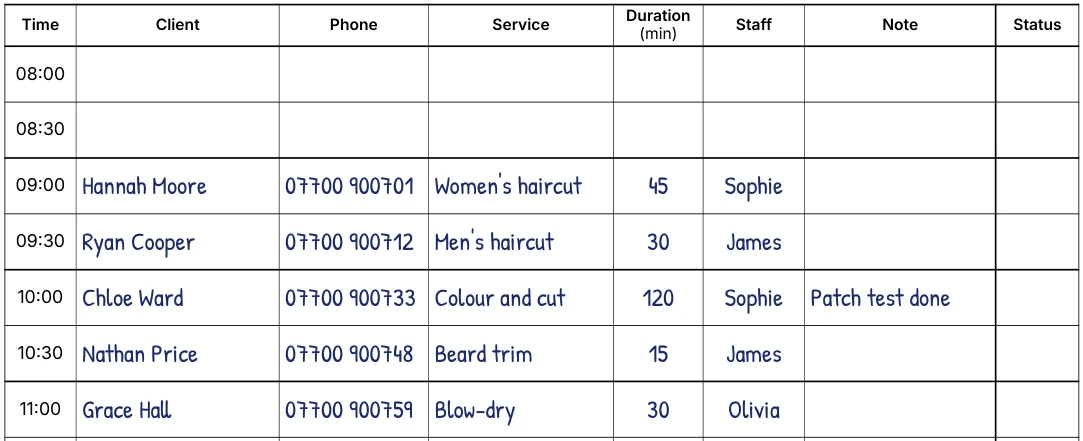
A printable appointment schedule gives the front desk one page for the day: who is coming, when, for what and with whom. This free appointment schedule template is for hair and beauty salons, barbers, clinics, therapists, garages and other service businesses. The day is split into time slots, and each booking records the client, phone number, service, duration, staff member and a note, with a column to mark arrived, cancelled or no-show. The day is printed in 24 half-hour slots from 08:00 to 19:30, and the Status column takes A for arrived, C for cancelled and N for no-show.
EZLineGo is software for small businesses: queue management, appointment booking, digital menus and HACCP logs on your phone.
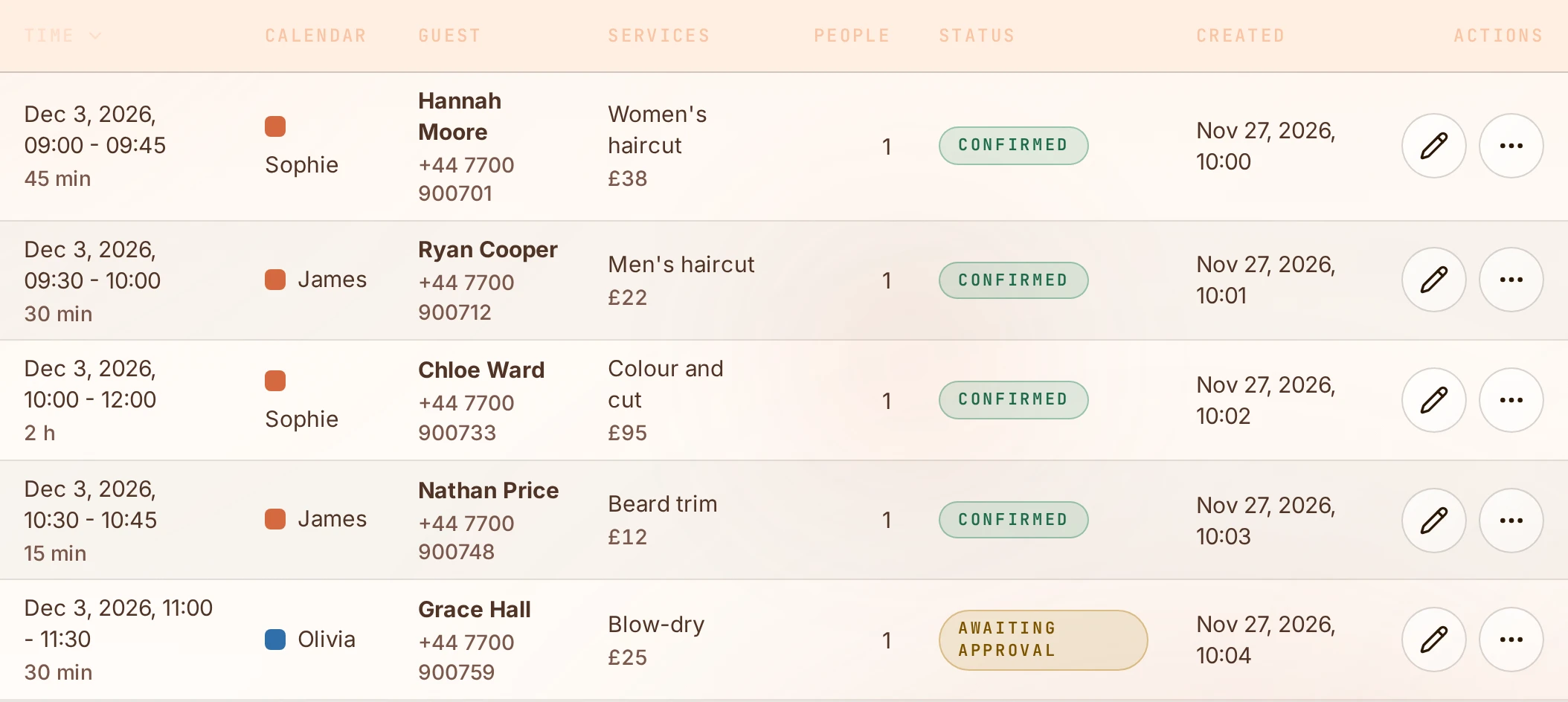
Booking calendars take appointments online or from staff with start time, calendar, client name, phone, email, booked services with duration and price, status and staff note, and send confirmations and reminders.
Use it every working day at the reception desk or chair, for a pop-up or event where online booking is not set up, or as a printed backup of the day’s bookings.
The sheet holds personal data such as names and phone numbers, so the UK GDPR in Great Britain and the GDPR in the EU apply: tell people why you collect the data (Article 13), write down only what you need (Article 5(1)(c)) and do not keep it longer than necessary (Article 5(1)(e)). Keep the sheet out of sight of other customers and shred it when its period is over. Block the full service time, keep one sheet per staff member or chair when several people work at once, and note cancellations instead of crossing them out so you can see your no-show rate.
EUR-Lex: General Data Protection Regulation (EU) 2016/679 · 2026-11-26
Book the full length of each service, including set-up and clean-down, so the next client is not kept waiting.
A hair salon, Tuesday 10 March 2026. 09:00: Client AB, phone written, Service cut and blow-dry, Duration 60, Staff Mia, line down to the 09:30 slot, Status A. 10:00: Client CD, colour and cut, 120 minutes, Staff Mia, line down to 11:30, Note patch test done on 3 March, Status A. 10:30: Client EF, beard trim, 30 minutes, Staff Leo, Status N. 14:00: Client GH, cut, 45 minutes, Staff Leo, cancelled by phone at 12:10, Status C, slot given to a walk-in. At closing the sheet shows 11 bookings, 1 no-show and 1 cancellation.
As long as your shortest common service, often 15 or 30 minutes. Longer services take several slots.
Booking calendars take appointments online or from staff with start time, calendar, client name, phone, email, booked services with duration and price, status and a staff note, and send confirmations and reminders.
No. The PDF and the editable file are free without registration. Using the app needs an account; you can try it free for 30 days.
The templates help with daily work. They do not replace legal, employment or tax advice.