When and why to use it
Use it every service at the host stand or phone, when you take bookings without an online system, during a system outage, or for an event night with a fixed list.
A restaurant reservation sheet is the paper page of a reservation book: every booking for one service in time order. This free restaurant reservation template is for restaurants, cafés, wine bars and private dining rooms that take bookings by phone or in person. The top holds the service, the tables and covers available and the host on duty. Each row records the time, the guest’s name, the covers, the table, a phone number, requests such as a high chair, a birthday or an allergy, who took the booking, the status (A arrived, C cancelled, N no-show) and the time the table is free again, with the total covers at the bottom.
EZLineGo is software for small businesses: queue management, appointment booking, digital menus and HACCP logs on your phone.
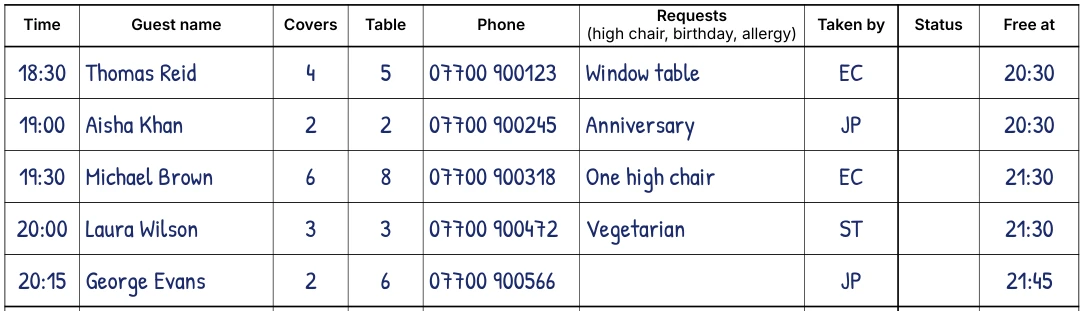
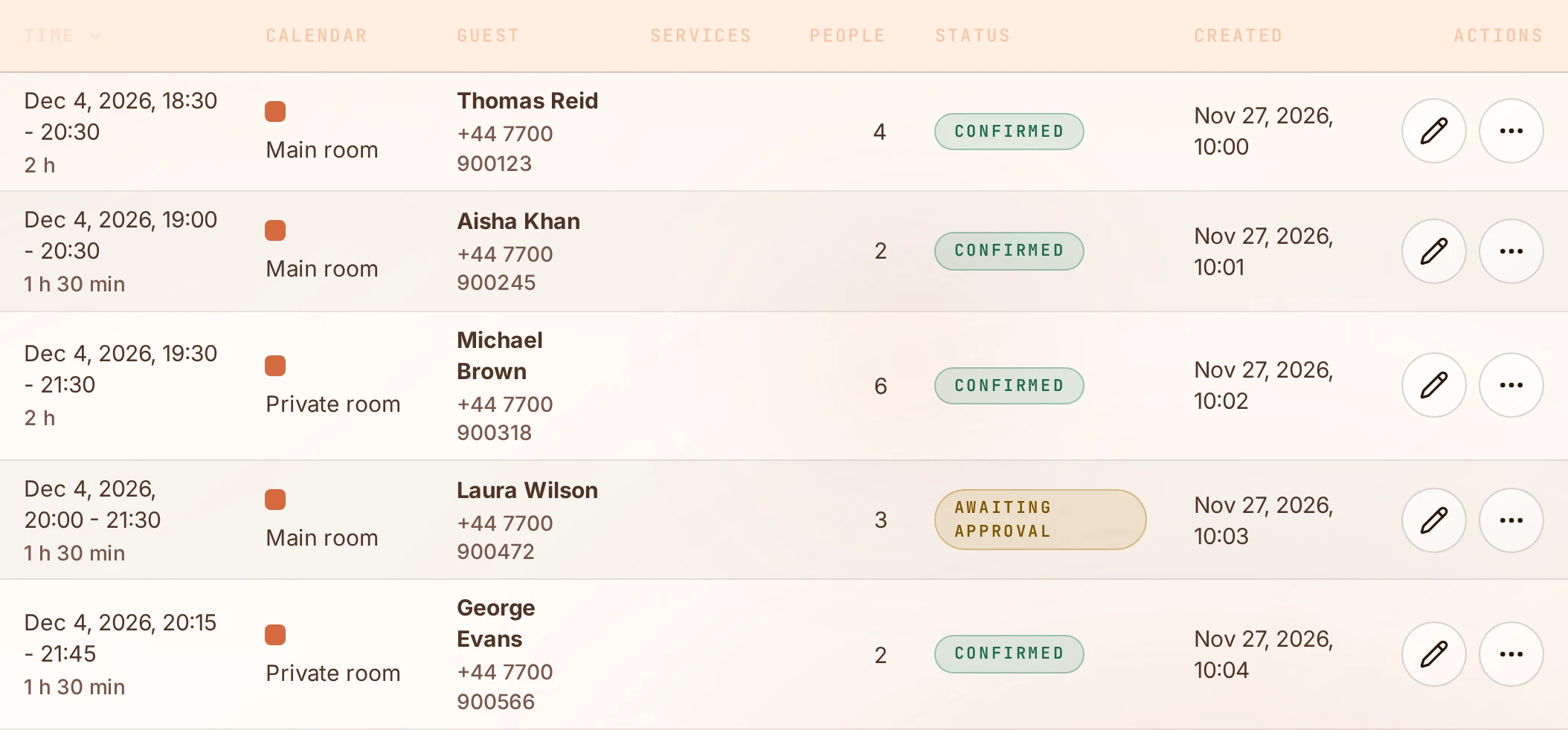
Table reservations are taken online or by staff with date and time, guest name, phone, party size, status and notes, with confirmation, reminder and no-show tracking.
Use it every service at the host stand or phone, when you take bookings without an online system, during a system outage, or for an event night with a fixed list.
The sheet holds personal data such as names and phone numbers, so the UK GDPR in Great Britain and the GDPR in the EU apply: tell people why you collect the data (Article 13), write down only what you need (Article 5(1)(c)) and do not keep it longer than necessary (Article 5(1)(e)). Keep the sheet out of sight of other customers and shred it when its period is over. Allergy notes on a booking help the kitchen prepare, but the dish information on allergens is still given at the table under the allergen rules. Count covers per time slot so the kitchen is not overloaded.
EUR-Lex: General Data Protection Regulation (EU) 2016/679 · 2026-11-26
Repeat the date, time and party size back to the guest before you write the booking, and write allergies exactly as the guest says them.
A 60-cover restaurant, dinner service on Friday 13 March 2026, Tables available 18, Covers available 60, Host on duty AB. 19:00: Guest name CD, Covers 4, Table 7, phone written, Requests high chair, Taken by AB, Status A, Free at 20:45. 19:30: EF, 2, Table 3, Requests birthday, candle on dessert, Taken by MT, Status A. 19:30: GH, 6, Tables 10 and 11, Requests one guest allergic to sesame, Status A. 20:00: IJ, 2, Table 5, Status N, Free at 20:15, the table goes to a walk-in. Total covers booked: 52 of 60.
Set a rule, for example 15 minutes, tell guests when they book, and write the release time on the sheet.
Table reservations are taken online or by staff with date and time, guest name, phone, party size, status and notes, with confirmation, reminder and no-show tracking.
No. The PDF and the editable file are free without registration. Using the app needs an account; you can try it free for 30 days.
The templates help with daily work. They do not replace legal, employment or tax advice.