When and why to use it
Use it whenever the restaurant is full and guests arrive without a booking, for example at weekend brunch, on event days or at a busy food truck.
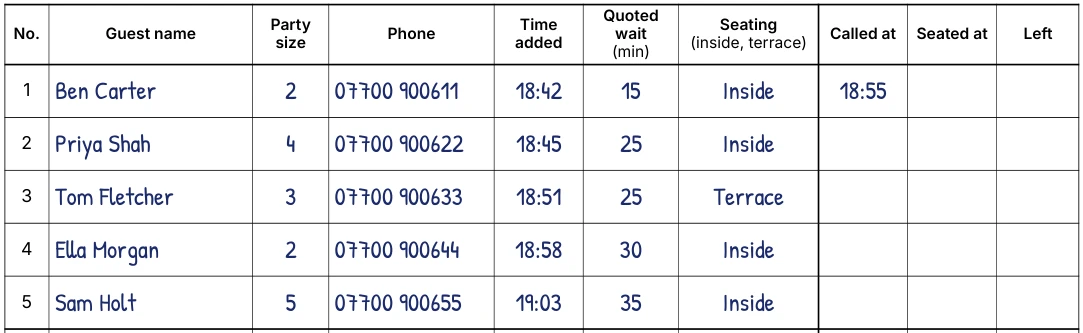
A restaurant waitlist template keeps walk-in guests in a fair order when every table is full. This free walk-in waitlist is for restaurants, cafés, brunch spots and food trucks with queues. Each row records the guest’s name, party size, phone number, the time they were added, the wait you quoted, a seating preference such as inside or terrace, and the time they were called and seated, or that they left.
EZLineGo is software for small businesses: queue management, appointment booking, digital menus and HACCP logs on your phone.
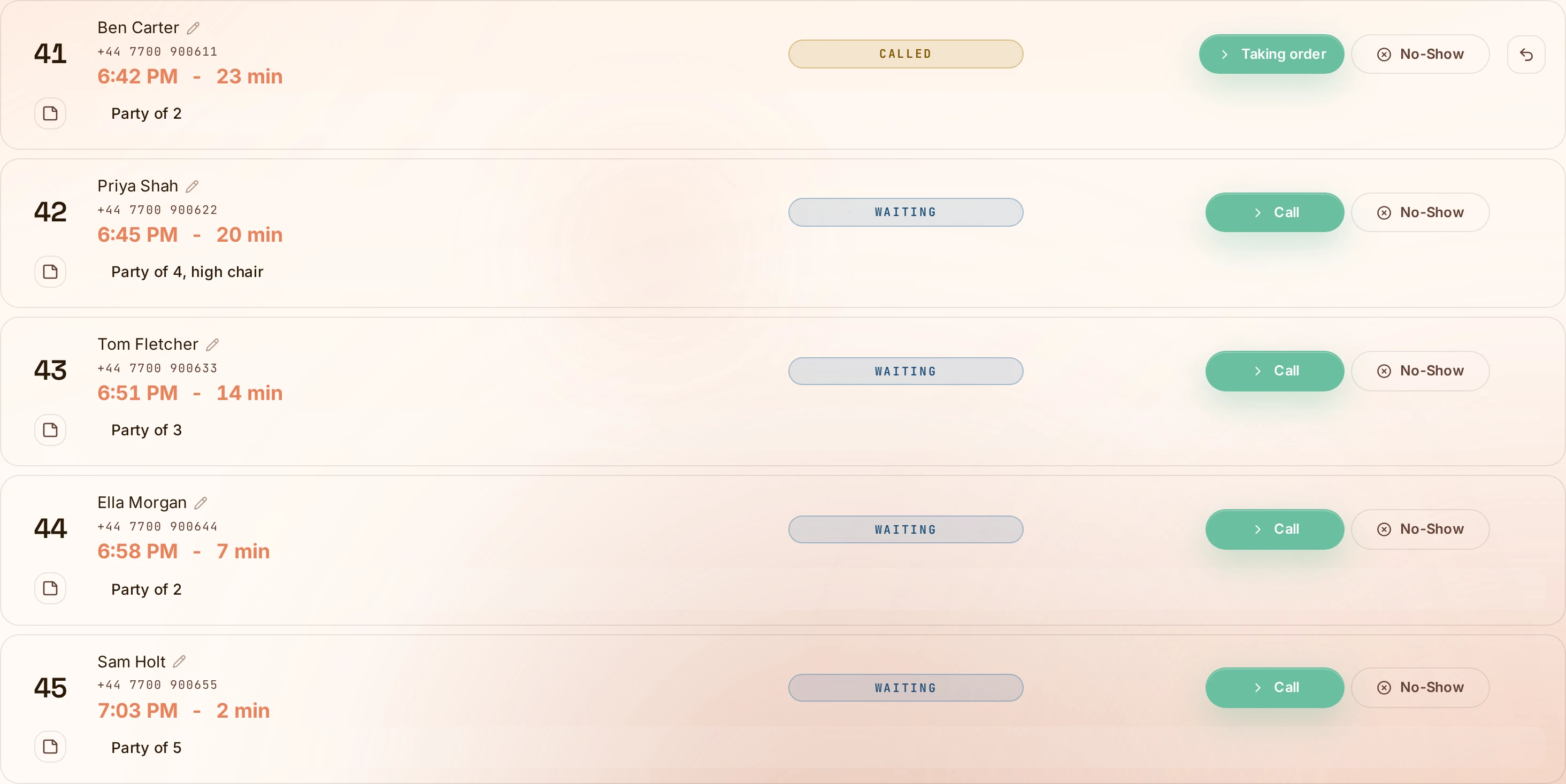
The queue is a walk-in waitlist: each guest is added by staff or joins by QR code with name and phone, gets a number and is called by notification, and the list keeps join, call and serve times with the wait time.
Use it whenever the restaurant is full and guests arrive without a booking, for example at weekend brunch, on event days or at a busy food truck.
The sheet holds personal data such as names and phone numbers, so the UK GDPR in Great Britain and the GDPR in the EU apply: tell people why you collect the data (Article 13), write down only what you need (Article 5(1)(c)) and do not keep it longer than necessary (Article 5(1)(e)). Keep the sheet out of sight of other customers and shred it when its period is over. Write the time each group was added so you can see your real wait times, and compare them with the waits you quoted to improve your estimates.
EUR-Lex: General Data Protection Regulation (EU) 2016/679 · 2026-11-26
Quote a wait you can keep and call guests in the order they were added, unless their party size fits a free table that the next group does not.
Saturday brunch on 14 March 2026, all 22 tables full at 11:10. No. 1: Guest name AB, Party size 2, phone written, Time added 11:10, Quoted wait 15, Seating inside, Called at 11:22, Seated at 11:24. No. 2: CD, 4, 11:14, Quoted wait 25, terrace, Called at 11:48, Seated at 11:50, a real wait of 36 minutes. No. 3: EF, 6, 11:20, Quoted wait 30, inside, Left ticked at 11:45. At the end of service the quotes for groups of 4 and more were about 10 minutes too short, so the host now quotes 35 minutes for them.
Count the tables in the size the group needs, check how long they have been seated and use your usual table time. Write the quote and compare it with the real wait at the end of service.
The queue is a walk-in waitlist: each guest is added by staff or joins by QR code with name and phone, gets a number and is called by notification, and the list keeps join, call and serve times with the wait time.
No. The PDF and the editable file are free without registration. Using the app needs an account; you can try it free for 30 days.
The templates help with daily work. They do not replace legal, employment or tax advice.