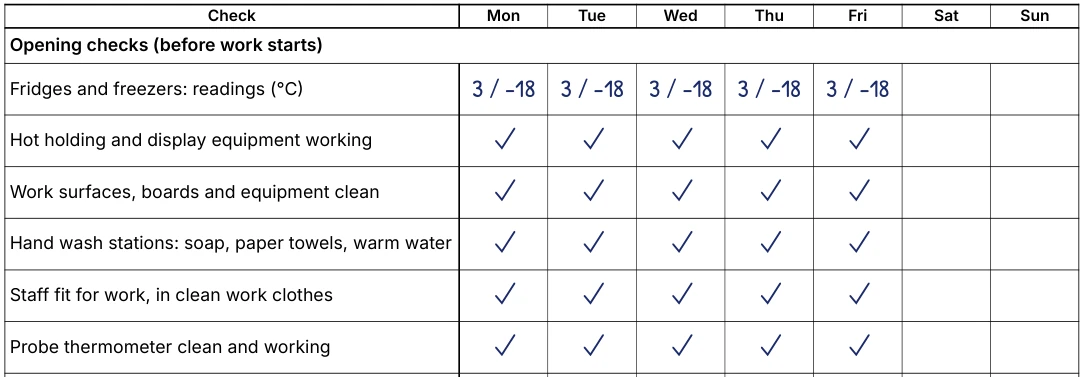
A restaurant opening and closing checklist makes sure the same food safety checks happen every day, whoever opens or closes. This free one-page sheet is for restaurants, cafés, food trucks and small kitchens and covers one week, Monday to Sunday. It lists 8 opening checks, such as fridge and freezer readings, hot holding equipment, clean surfaces and stocked hand wash stations, and 8 closing checks, such as covered and dated food, cooked food cooling, cleaned surfaces, emptied bins and doors closed, with an Opened by and a Closed by row for initials, lines for problems and actions, and the manager’s sign-off.
When and why to use it
Use it every trading day: the first person in completes the opening column before food is prepared, and the last person out completes the closing column. It is useful for food trucks and pop-ups that set up and pack down each day, and for kitchens where different staff open and close.
Practical guidance
No law prescribes an opening and closing checklist, but Regulation (EC) No 852/2004 requires the hygiene measures that these checks confirm, and the Food Standards Agency’s Safer Food Better Business pack builds its daily diary around opening and closing checks. Choose the checks from your own HACCP plan, keep the list short enough to finish in a few minutes, and write any problem and what you did about it, not only a tick. If a check fails, the corrective action goes on the sheet before the day continues.
Food Standards Agency: Safer food, better business for caterers · EUR-Lex: Regulation (EC) No 852/2004 on the hygiene of foodstuffs · 2026-11-26
Write the actual reading where a check has a number, such as a fridge temperature. A tick alone does not show what was checked.
How to fill it in, in 5 steps
- 1Fill in Business name, Location and Week beginning.
- 2At opening, write the fridge and freezer readings in °C in the day’s column, then tick or initial each opening check, and initial Opened by.
- 3At closing, check each closing line in the same column, write the closing fridge and freezer readings, and initial Closed by.
- 4When a check fails, write it under Problems and what we did with the day, the problem, the action and your name.
- 5At the end of the week the manager reads the sheet and signs Checked by manager with the date.
How it works day to day
- 1At opening, check and write the fridge and freezer readings, then tick the hygiene checks on the list.
- 2Write any problem found, the action taken and the time.
- 3At closing, check food storage, labels, cleaning, waste and equipment, and tick each line.
- 4Sign both columns; the manager reviews the week’s sheet.
Worked example
Week beginning 9 March 2026 at a café with two fridges and a freezer. On Monday the opener writes 3 / 4 / -19 in Fridges and freezers: readings (°C), ticks the other seven opening checks and initials Opened by: KB. On Wednesday the hand wash station has no paper towels at 07:10; KB writes under Problems and what we did: Wed, no paper towels at hand basin, refilled from store, ordered 2 cases, KB. At closing on Wednesday the second fridge reads 7 °C; the closer moves the dairy to the first fridge and writes Wed, fridge 2 at 7 °C, dairy moved, checked again 21:30 at 5 °C, MT. On Sunday the manager signs Checked by manager with the date 15 March 2026.
Common mistakes
- Filling in the closing column the next morning.
- Ticking the fridge line without writing the temperature.
- Keeping checks on the list that no longer apply, so staff stop reading it.
- Noting a fault without the action taken.
Is this sheet the same as Safer Food Better Business?
No. It is an independent checklist. Safer Food Better Business is the Food Standards Agency’s own pack; this sheet can sit next to your own food safety management system.
What does EZLineGo do for opening and closing checks?
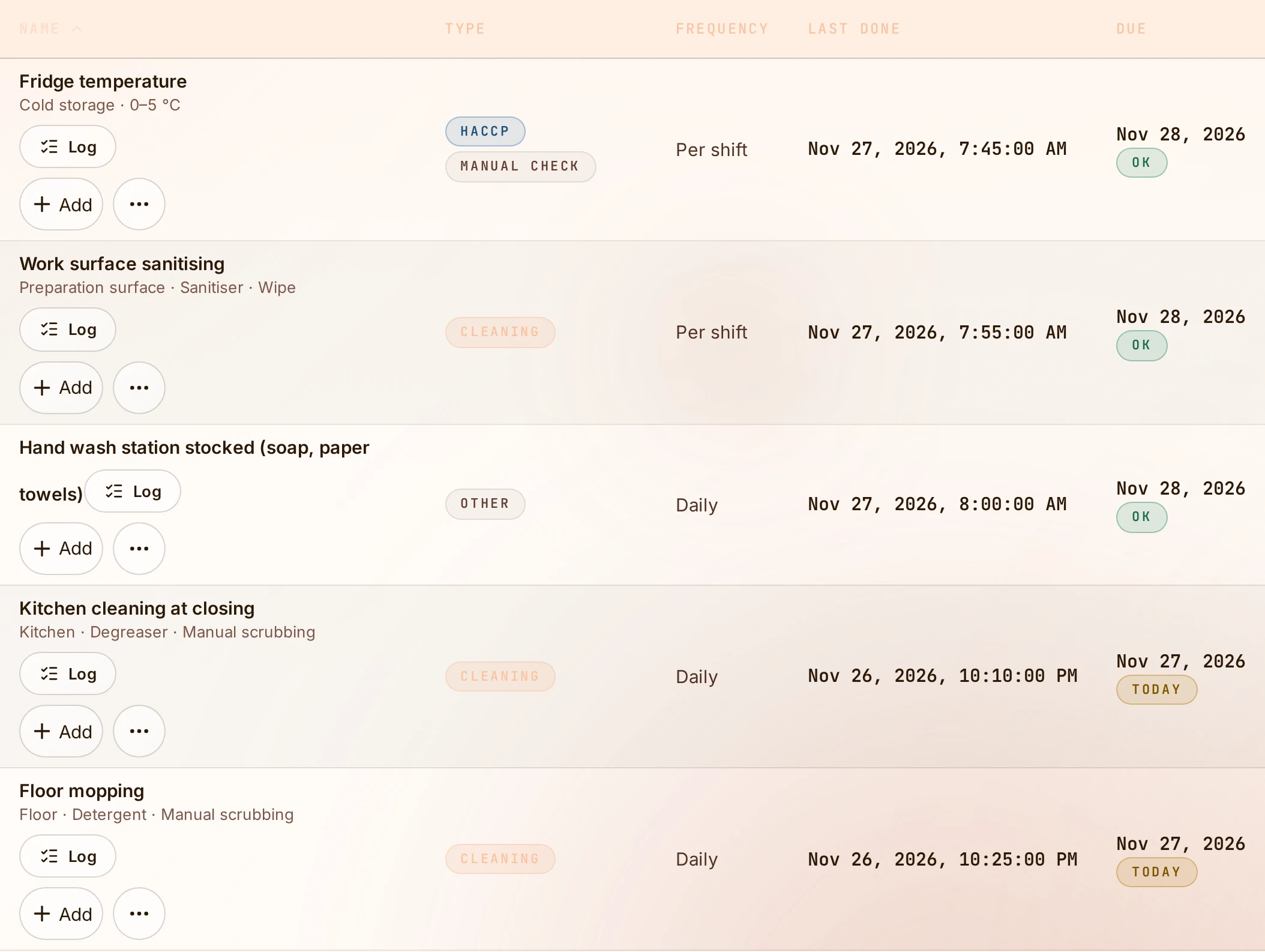
The hygiene page lists the daily and per-shift checks, such as fridge readings, surface sanitising, kitchen cleaning at closing and your own plans, with the last check and next due time, and each check is saved with time and person.
Do I need an account for the blank form?
No. The PDF and the editable file are free without registration. Saving records in the app requires an account and Pro access or an eligible 30-day Pro trial; no card is required for the trial.